

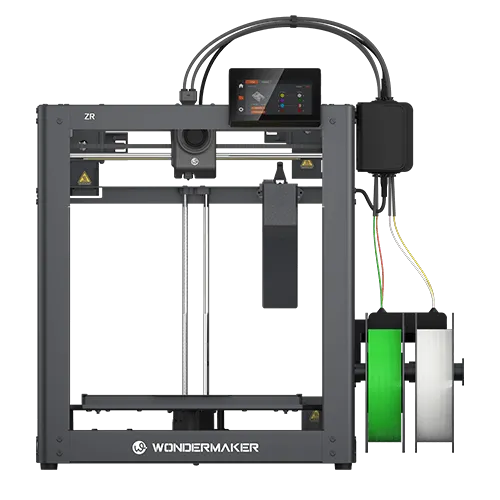
A successful 3D printing workflow depends on more than printer hardware. The software used to prepare, slice, monitor, and manage a print can directly affect print quality, material use, production time, and troubleshooting efficiency. When users encounter slicing errors, unexpected toolhead behavior, failed prints, or software compatibility issues, access to responsive and relevant support becomes especially important.
This is where 3D printing software custom support can make a practical difference. Instead of relying only on general troubleshooting information, users can receive assistance that considers their printer model, software environment, materials, and specific printing requirements.
For users working with complex multi-color or multi-material projects, this type of support can make the workflow easier to manage and reduce unnecessary trial and error.
What Does Custom Support Mean for 3D Printing Software?
Custom software support refers to assistance that addresses a user’s specific technical situation rather than providing only generic instructions. In 3D printing, the issue may involve slicing settings, printer profiles, material parameters, file preparation, software updates, or communication between the printer and computer.
For example, a user may successfully create a standard single color print but experience problems when preparing a model that requires several materials or toolheads. The solution may depend on the printer configuration and the way the slicing software interprets the model.
A support team familiar with both the software and compatible hardware can help identify the source of the problem more efficiently. This is particularly useful when the workflow involves specialized functions that are not covered by basic software tutorials.
Reducing Trial and Error During Slicing
Slicing is one of the most important stages in the 3D printing process. The slicer converts a digital model into instructions that the printer can follow, so incorrect settings can result in poor surface quality, weak structures, excessive material use, or failed prints.
Professional users often need to balance layer height, infill, support structures, temperature, speed, cooling, and material selection. Multi-color printing introduces additional considerations, including color assignment and toolhead management.
WonderMaker 3D provides Wonderprint Orca, a slicing solution based on Orca Slicer and optimized for its ZR series. The software includes printer specific profiles, multi-color tools, multi-material functions, and algorithms designed around independent toolhead systems.
When users have questions about these functions, targeted software support can help them understand which settings matter for a particular printing task instead of repeatedly changing parameters without a clear direction.
Connecting Software Support With Printer Hardware
One challenge with 3D printing software is that software settings cannot always be separated from hardware characteristics. Different printers may use different toolhead structures, motion systems, build volumes, sensors, or material configurations.
This means a generic software recommendation may not always produce the expected result.
Custom support can bridge the gap between software and hardware by considering the complete printing environment. WonderMaker’s support center organizes assistance around its ZR, ZR Ultra, and ZR Ultra S printers, while also providing access to software resources, manuals, release notes, and printer support.
This structure gives users a more direct way to identify information relevant to their specific equipment.
Making Software Updates Easier to Manage
Software development does not stop after a printer is purchased. Updates may introduce new functions, improve compatibility, correct bugs, or refine printing performance. However, users may also have questions about how an update affects existing profiles or workflows.
Clear support is useful when users need to determine whether an issue is caused by software settings, a version change, or another part of the printing system.
WonderMaker states that its product updates can include bug fixes, system software updates, model updates, performance improvements, and new features. Its terms also describe a commitment to providing software updates for five years from product release.
For users operating printers regularly, this ongoing software support can help maintain a more consistent workflow as the platform develops.
Supporting Remote Monitoring and Daily Management
Modern 3D printing workflows increasingly involve monitoring rather than simply starting a print and waiting for completion. Software and mobile applications can help users check progress, review previous projects, and identify problems without remaining beside the printer throughout the entire process.
The WonderMaker App provides real time device status monitoring through a local network connection, including print progress and camera based monitoring. It also allows users to review printing history and initiate support requests.
For users managing multiple projects, these functions can reduce unnecessary interruptions and make routine print management more convenient.
What Should Users Look for in Software Support?
When choosing a 3D printing system, users should evaluate software support alongside printer specifications. Useful support should be easy to access, relevant to the actual hardware, and capable of addressing both basic and technical questions.
Documentation is important because users need clear instructions for setup and common problems. Release notes can help them understand software changes. Direct technical assistance is also valuable when an issue cannot be resolved through standard documentation.
WonderMaker’s support center brings these resources together with printer manuals, software information, release notes, and direct contact options. Its after sales team states that it aims to respond to product use problems within 24 hours.
Building a More Reliable 3D Printing Workflow
Good software support does not replace careful printing practices, but it can make the entire process more predictable. Users can spend less time searching for unrelated solutions and more time focusing on model preparation, production, and design.
For beginners, accessible support can shorten the learning process. For experienced makers, it can provide a practical resource when working with advanced features or unusual printing requirements. For teams using 3D printers regularly, consistent technical assistance can also help reduce interruptions and maintain smoother production.
A Practical Approach to 3D Printing Software Support
The value of 3D printing software custom support lies in its ability to connect technical guidance with real printing conditions. Rather than treating software, hardware, materials, and user requirements as separate elements, effective support considers how they work together.
With its Wonderprint Orca software, WonderMaker App, printer specific resources, manuals, release notes, and support channels, WonderMaker 3D provides users with several ways to address software and printing questions.
As 3D printing becomes more sophisticated, reliable software support will remain an important part of the user experience. Choosing a platform with clear documentation and accessible technical assistance can help users solve problems more efficiently and build a more consistent workflow from digital model to finished print.
